Key Takeaways:
- A yard management system (YMS) replaces spreadsheets, radios, and manual yard walks with real-time visibility into trailers, drivers, docks, and yard activity.
- By connecting gate operations, trailer tracking, dock scheduling, and driver tasking into one workflow, a YMS helps your team move from reactive coordination to controlled yard execution.
- Manual yard processes create hidden costs through detention fees, overtime labor, misplaced trailers, delayed dock turns, and poor asset utilization.
- The best YMS platforms improve efficiency, accountability, and operational consistency across each facility and the wider yard network.
You're running a yard on spreadsheets and radio calls, but you still can't answer the basic questions: Where is that trailer? How long has it been sitting? Which dock should open next?
Your drivers may circle the lot hunting for assets while detention fees pile up unnoticed. Manual lot walks are outdated before you finish them. Costs accumulate invisibly — idle containers, compounding detention charges, overtime hours — until they impact your P&L.
A yard management system stops that chaos. It replaces guesswork with real-time control.
What Is a Yard Management System?
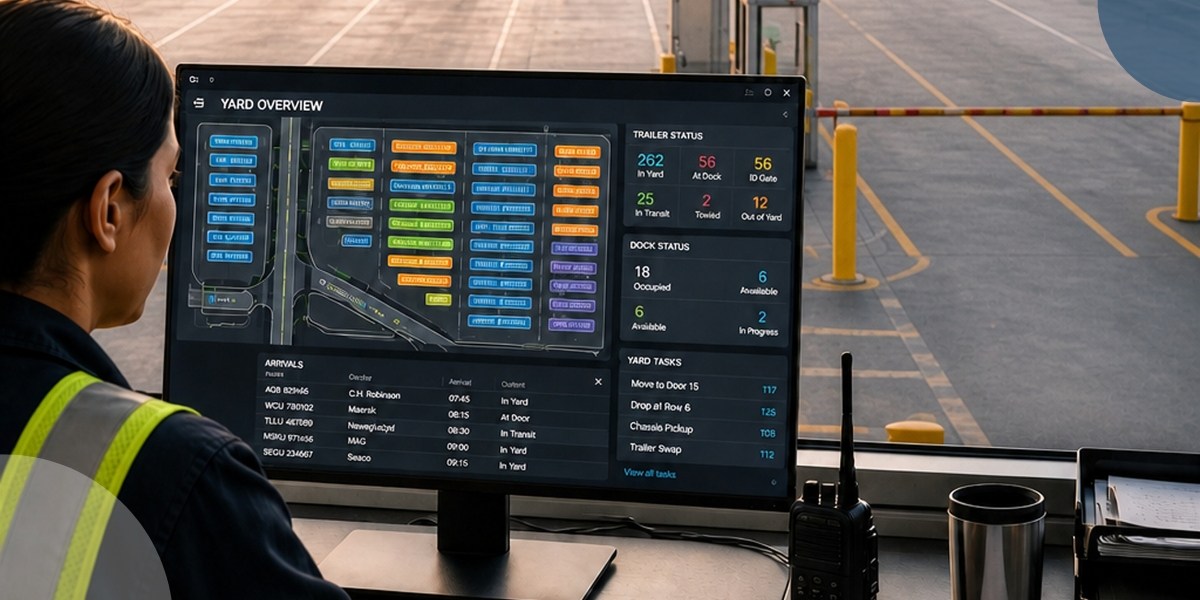
A Yard Management System (YMS) is software that generally tracks trailers, directs drivers, manages gate flow, and coordinates dock activity in real time. It replaces manual yard tracking with real-time visibility and automates workflow across gate, yard, and dock operations.
A yard management system can stop trailers from getting lost in the yard. Drivers get clear instructions without radio calls. Your team knows where every trailer sits and what should move next.
Purpose-built YMS such as YardView go a step further and track all post-arrival movement, too. So, if a trailer is sent to a holding lot, moved to a dock, or moved back to a holding lot, YardView collects all of that movement data.
In addition, YardView can collect and track all the way down to SKU-level details, including full asset management, asset tracking, etc. It effectively replaces clipboards, whiteboards, spreadsheets, and legacy systems with complete digital visibility.
How a YMS Connects Gate, Yard, and Dock Into One Operation
A YMS syncs gate check-in, yard movement, and dock assignment through shared data and automated handoffs. When a trailer checks in at your gate, the system knows which dock door to route to or where to park in the yard. Your yard drivers see which trailers are dock-ready.
This gives your team visibility into trailer location, load status, and dock availability in real time. Your team can make quick decisions about moves, assignments, and priorities. No radio calls or manual work between departments needed.
Core YMS Functionality That Solves Day-to-Day Yard Problems
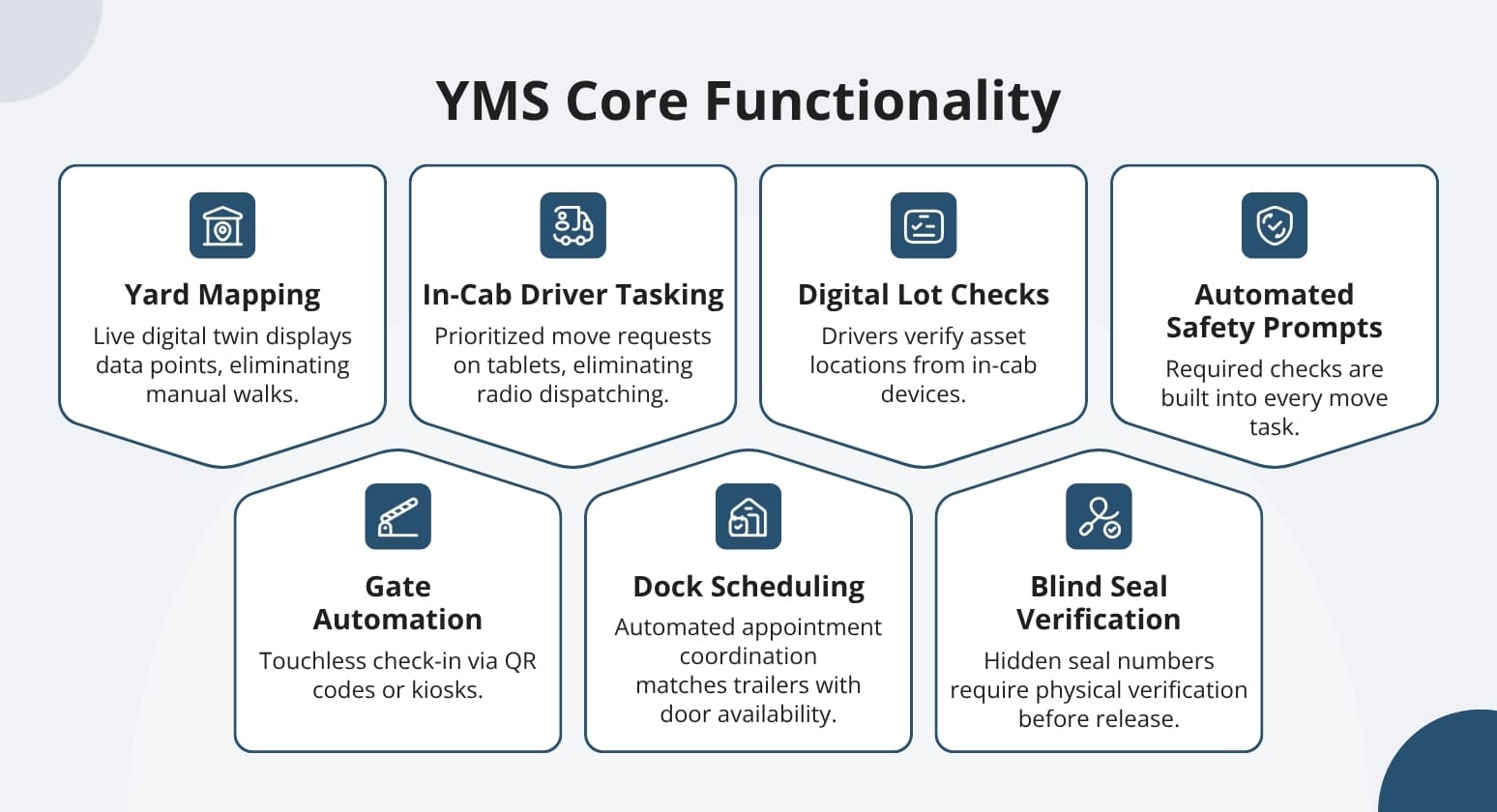
YardView YMS delivers value through seven core capabilities that replace manual yard chaos with automated workflows and real-time control.
Each function eliminates a specific bottleneck that costs you time, money, or safety compliance every day.
- Real-Time Yard Mapping and the Drag-and-Drop Console — A live digital twin of your entire yard displays up to 20 data points per asset, eliminating manual lot walks and giving you instant visibility into every dock, spot, and lane.
- Gate Automation — Touchless check-in via QR codes, AI cameras, or self-service kiosks removes paper processing and keeps OTR drivers in their cabs while directing them to the right location immediately.
- In-Cab Driver Tasking and Next-Best-Move Logic — Your spotters receive prioritized move requests directly on their tablets with Accept → Start → Finish workflows, eliminating radio dispatching and the time spent hunting for their next assignment.
- Dock Scheduling and Appointment Management — Automated appointment coordination matches trailer staging with door availability, preventing dock doors from sitting idle while trailers queue in the yard.
- Digital Lot Checks and Yard Audits — Drivers verify asset locations and update positions from their in-cab devices, cutting manual yard walk time by up to 75%.
- Blind Seal Verification and Cargo Security — Hidden seal numbers require physical verification before release, preventing both accidental mis-shipments and cargo theft.
- Automated Safety, Compliance, and Inspection Prompts — Required checks are built into every move task with automatic documentation, eliminating missed inspections and creating audit-ready records.
The Four Phases of Yard Operations a YMS Should Cover
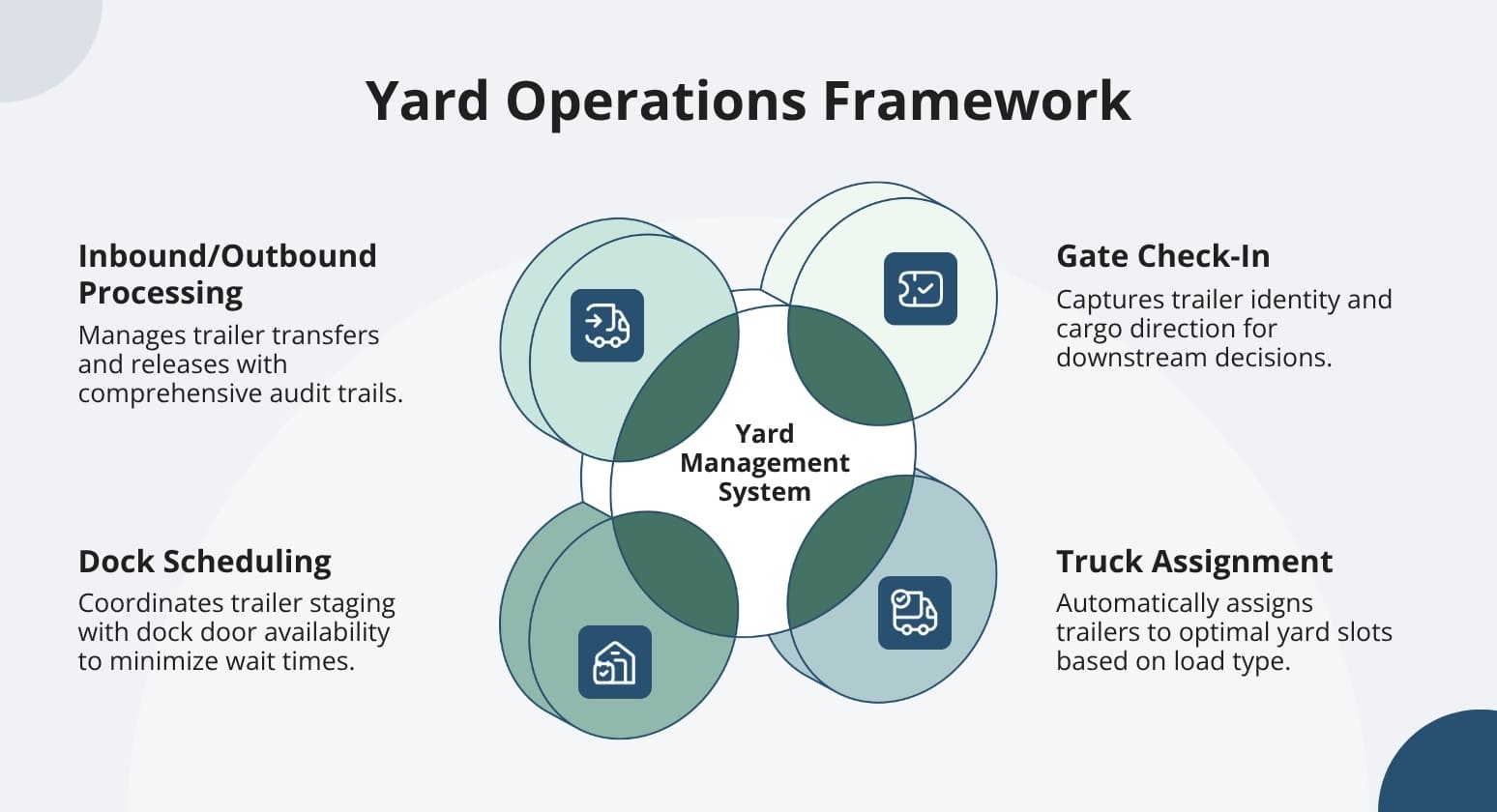
A yard management system should track and direct trailers through their complete lifecycle — from gate arrival to final departure.
This process framework covers four distinct operational phases. Decisions get made, handoffs occur, and costs build up.
Phase 1: Gate Check-In and Receiving
Gate check-in captures trailer identity, seal status, and cargo direction — the foundation data that drives every downstream decision. Your gate team records exact asset details and directs each trailer to its assigned location, eliminating guesswork.
Phase 2: Truck Assignment and Yard Slotting
Once your trailer checks in, the YMS automatically assigns it to the right yard slot based on load type, urgency, and available dock doors. This eliminates the manual search for open slots. Your driver receives exact directions and goes straight to the assigned location.
Phase 3: Dock Scheduling and Door Assignment
Dynamic scheduling connects door availability with trailer readiness in real time. By matching loads to open doors, the system cuts driver wait times and keeps your dock workers moving.
Phase 4: Inbound Processing, Outbound Release, and Warehouse Handoff
Outbound trailer records can be compared to WMS or TMS records. This helps ensure cargo security.
How People, Process, and Technology Determine YMS Success
A successful yard management strategy isn't just a technology decision.
Technology creates clarity. But your facility's communication culture decides whether that clarity drives action.
Process (The Workflows That Guide Your Yard)
Your yard workflows are the foundation a YMS builds on — not what it replaces. Deploy technology onto broken processes and you get faster broken processes. Document what works before you digitize it.
People (The Spotters, Gate Guards, and Managers)
Your spotters, gate guards, and dock supervisors determine whether any yard system actually gets used. Technology can be perfect on paper, but if your frontline team doesn't trust it, adoption fails regardless of training quality.
Technology (The Platform That Connects Everything)
Technology serves as the support layer that amplifies your process and people. A well-designed YMS shows your gate guard which dock to assign, tells your spotter which trailer moves next, and alerts your dispatcher when dwell hits the detention threshold — reducing decision fatigue across every role.
Why Technology Creates Clarity, but Communication Culture Drives Adoption
Technology creates clarity. But your facility's communication culture decides whether that clarity gets used.
The difference comes down to the implementation approach. Facilities that see measurable ROI work with vendors who treat deployment as a relationship, not a handoff.
YardView's three-phase model shows this well. Phase 1 mirrors your current processes to cut disruption. Phase 2 connects your existing systems. Phase 3 cuts manual steps and move times.
Turn Yard Chaos Into Operational Clarity with YardView
Running your yard on radio calls, spreadsheet counts, and manual lot walks keeps you guessing when you need certainty.
YardView replaces that blindness with digital visibility.
- YardView's drag-and-drop visibility console displays up to 20 data points per asset across every dock, spot, lane, and zone in a single live view — your dispatchers see exact trailer locations, load status, and dwell times without leaving the office, reducing the need for manual lot walk.
- YardView's in-cab move request system delivers prioritized, next-best-move tasking directly to your drivers' devices so they never wait on a radio call for their next assignment. Digital yard audits let your team verify and update asset positions from in-cab devices — up to 75% faster than manual walks with instant accuracy across your entire operation.
- YardView's Detention & Demurrage module tracks dwell in real time and triggers proactive alerts before fees accumulate — customers report up to 95% reduction in D&D charges with documented timestamps for every gate and dock event.
- Automated gate processing guides OTR drivers through check-in via QR codes, SMS notifications, or touchless kiosks, eliminating gate congestion while providing automated arrival, loading, and departure updates.
- YardView has over 400 reports, can create custom reports on any data collected, and has enterprise-ready reports.
See how YardView's yard management system delivers measurable ROI. It offers predictable pricing and fast setup.
FAQs:
What Is the Purpose of a Yard Management System?
A YMS replaces manual yard tracking. It gives real-time visibility and workflow automation. This covers gate, yard, and dock operations.
It shows which dock doors are busy. Dispatchers can redirect drivers right away. It cuts manual gate check-ins. It cuts dock assignment time from hours to minutes.
You get better throughput. The platform automatically captures operational data for compliance reporting.
How Long Does YMS Implementation Take?
Most YardView implementations take six weeks or less. Your yard stays operational throughout the rollout using a phased approach that eliminates disruption.
Phase 1 mirrors your existing processes in the web-based system while your team learns the interface. Phase 2 adds system integrations. Phase 3 introduces optimization features.
Each phase builds on the last without stopping daily operations.
Do I Need Special Hardware to Run a YMS?
No. A modern YMS runs on your existing PCs, tablets, phones, and in-cab devices — no additional proprietary hardware required. You can also leverage existing GPS in yard trucks for location tracking.
The system connects to what you already have. So setup focuses on workflow improvement rather than hardware setup.

.webp)