
Key takeaways:
- Right-sizing a yard is not about adding acreage. It is about matching the space you already have to demand with capacity limits and parking rules the system enforces on every arrival.
- When trailers park wherever a driver finds a gap, empties end up in dock-adjacent spots, reefers land nowhere near power, and spotters burn a shift hunting for the right unit.
- Capacity limits and parking rules only work if the yard enforces them automatically, directing each trailer to the right spot at check-in instead of leaving the call to whoever is on the radio.
- A live view of open space by zone turns "we think we're full" into a number, so you place the next trailer on data rather than a guess.
A cluttered yard rarely looks like a capacity problem. It looks more like a hunting problem. Spotters circle the lot for a trailer that should have been easy to find, empties sit in the spots your loaded freight needs, and the back rows fill with equipment nobody has looked at in days.
If your yard runs on a driver's best guess about where to park, that clutter is the default, not the exception. Right-sizing fixes it by deciding in advance how much each area holds and which trailer belongs where, then letting the yard management system enforce those decisions on every move.
This guide walks through four steps to set capacity limits, write parking rules, auto-direct trailers, and keep your open space working.
1. Map the Yard Into Zones and Set Capacity Limits
You cannot right-size a space you have not defined. Start by dividing the yard into the zones your operation already thinks in terms of: inbound staging, outbound staging, an empty pool, reefer spots near power, a drop lot for carrier equipment, and any hazmat or overflow areas.
Give each zone a real capacity, not a rough estimate. A zone that holds 40 trailers should be configured to hold 40, so the system knows when it is full rather than letting one area quietly overflow into the next.
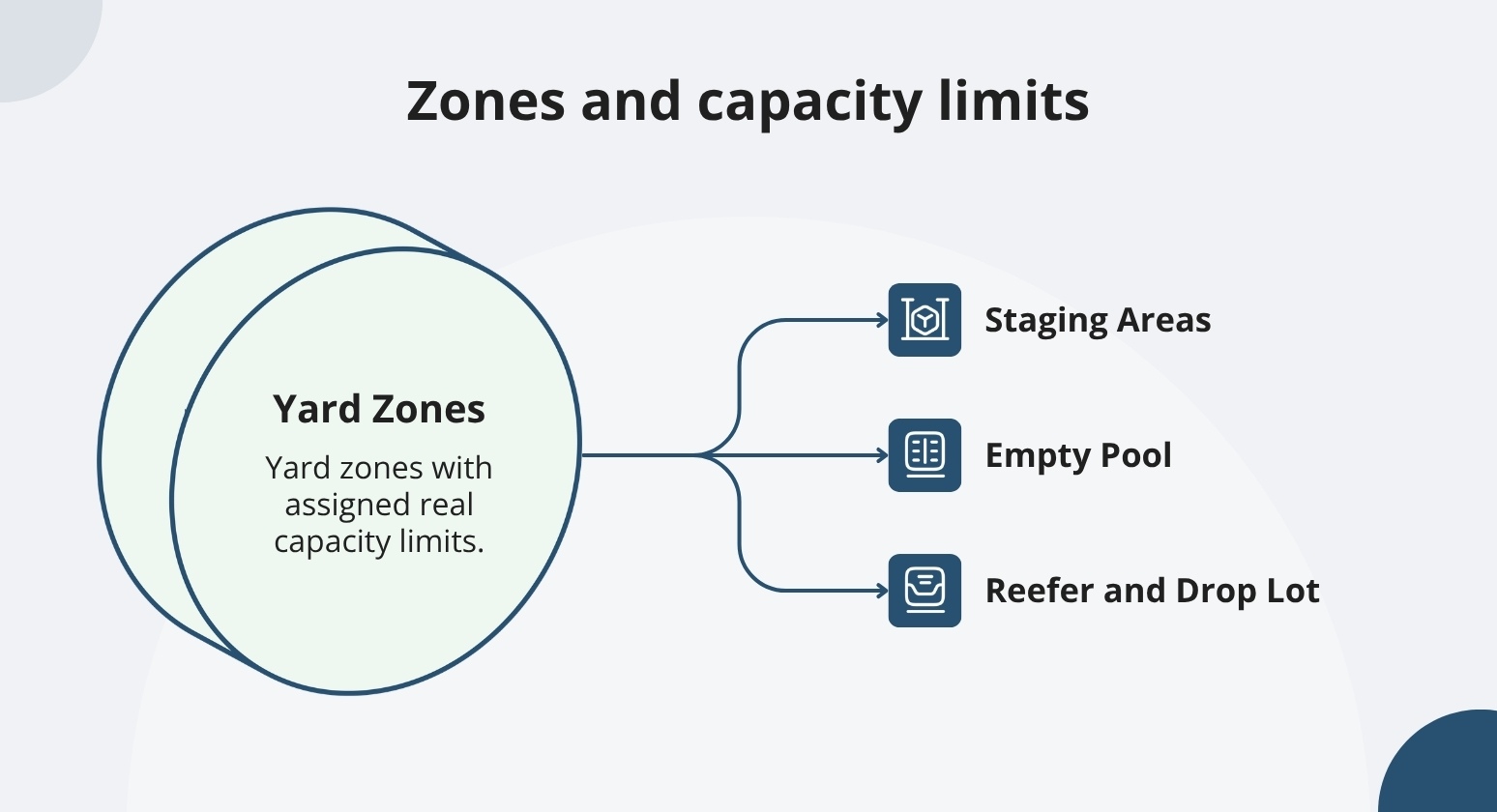
Capacity limits do two things at once. They stop a single zone from swallowing space that belongs to another, and they give you an early signal when demand is about to outrun a zone, while you still have time to shift equipment. A rules-driven yard works this way rather than running on the memory of whoever walked the lot last.
Lay the zones and their limits side by side before you commit. When you can see that the empty pool is chronically over capacity while the drop lot sits half empty, the fix is often a boundary change, not more asphalt.
2. Write Parking Rules That Match Each Trailer to the Right Zone
Once the zones exist, decide what belongs in each one. Parking rules connect a trailer's attributes to a location, so the destination is settled before the truck reaches the gate rather than improvised after it.
Good rules usually key off a handful of attributes:
- Load status: Loaded inbound heads to receiving staging, loaded outbound to a door-adjacent spot, empties to the empty pool so they stop occupying prime space.
- Trailer or equipment type: Reefers route to spots with power, flatbeds and specialized equipment to areas built for them.
- Temperature and hazmat: Refrigerated and regulated loads follow rules that keep them compliant and away from where they should not sit.
- Carrier or customer: Drop-lot equipment parks in that carrier's assigned area, and a customer with dedicated space lands there every time.
Keep the rule set tight enough that a new dispatcher could read it and understand the logic. The goal is a clear, enforceable standard for the whole yard, not a private routine that changes with the shift.
Rules like these also make the rest of your yard automation dependable, since every downstream move starts with a trailer sitting where it is supposed to be.
3. Auto-Direct Trailers With Directed Parking and Next-Best-Move
Rules on paper change nothing until the system acts on them. This is where right-sizing earns its keep: the moment a trailer checks in, directed parking reads its attributes, checks zone capacity, and assigns the exact spot, so the driver gets a destination instead of a shrug.
Directed parking closes the gap between the rule and the reality. A driver who used to park wherever there was room now pulls straight to an open, correct spot, which cuts the second walk a spotter makes to move a misparked unit later. Keeping drivers on a clear, guided path also supports the safety case for less loose movement across the lot.
Inside the yard, next-best-move logic carries the same discipline into every reposition. When a door is vacant, or a load is ready, the system suggests the move that keeps the yard balanced, and the driver works a simple Accept, Start, Finish flow on an in-cab device.
When a zone hits its limit, the rules point overflow to the fallback area you defined rather than letting it spill into dock-adjacent spots.
The result is a yard that stays organized as a byproduct of normal work, not because someone walked it and reset it by hand.
4. Monitor Open-Space Utilization and Keep the Rules Current
Right-sizing is not a one-time setup. Demand shifts with the season, a customer ramps up, a carrier leaves, and the boundaries you drew in the spring stop fitting by the fall. The way you catch that drift is by watching open space as a live number.
A real-time console shows current inventory, inbound and outbound volumes, and open-space availability by zone, so "we think we're full" becomes a count you can act on.
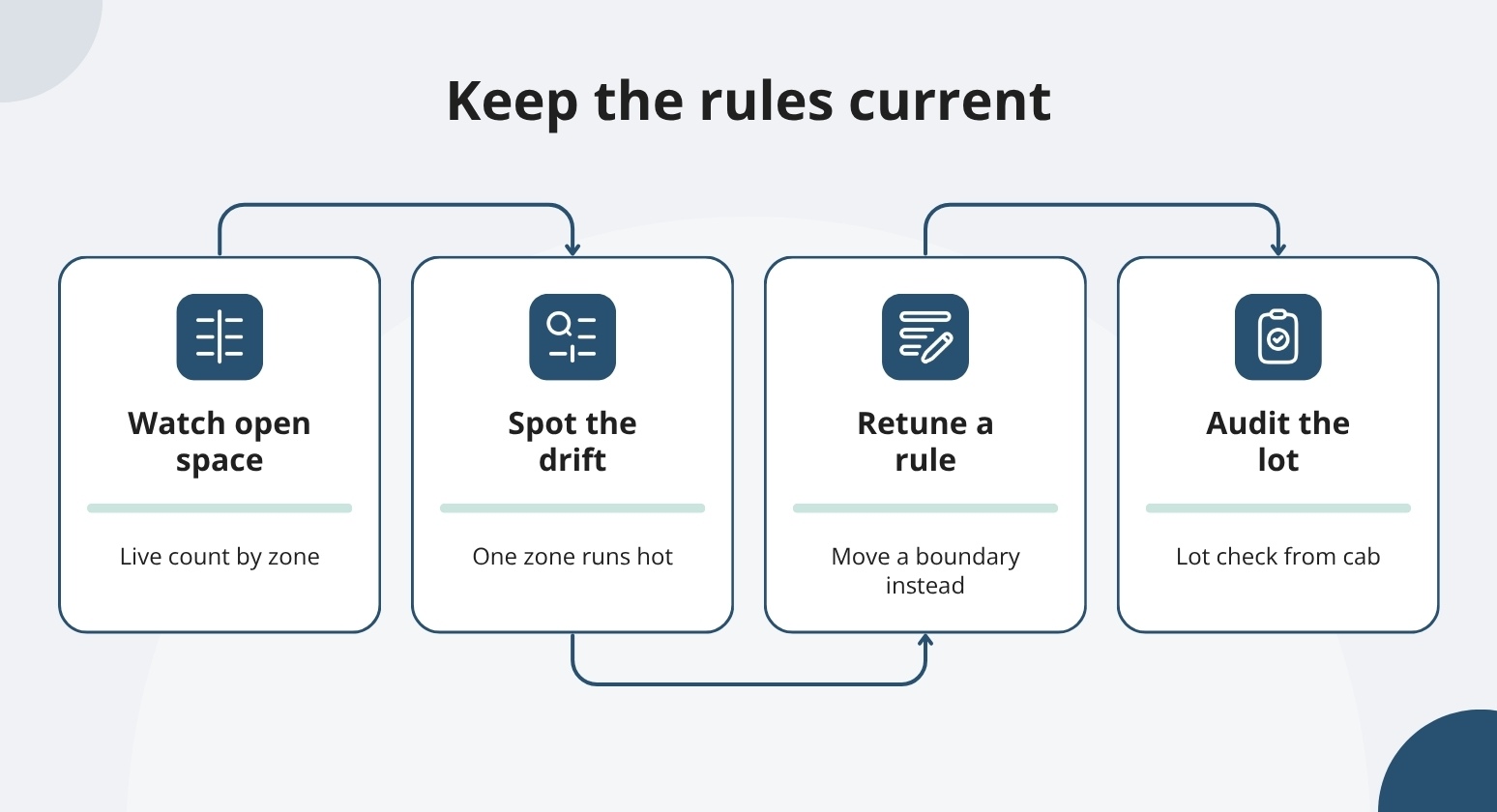
When one zone runs hot every afternoon while another sits idle, that is your signal to move a boundary or retune a rule. Tracking utilization alongside dwell and other yard metrics keeps the picture honest over time.
Back the live view with periodic yard audits so the record matches the ground. A lot check from an in-cab device lets drivers confirm what sits where, flag a missing unit, and correct a location without a clipboard, which keeps your capacity numbers trustworthy.
Watch: Faster Lot Checks: Confirm, Update, Done. #yardmanagement #supplychain #efficiency #saas. Clip demonstrates YardView's Lot Check module verifying and updating trailer locations without a clipboard.
Done this way, right-sizing becomes a routine you tune, and the payoff shows up as reclaimed space. Facilities that keep equipment moving on rules like these have trimmed leased trailer pools by up to 25% rather than paying to store trailers they had simply lost track of.
Right-Size Your Yard With YardView
A cluttered yard is rarely short on space. It is short on rules the system enforces and a live view of what is actually open. YardView brings both together, so capacity limits, parking rules, and directed moves run on every arrival:
- Drag-and-Drop Yard Console: See up to 20 data points per asset on a live map, color-coded by load status, carrier, location, and dwell, with inventory counts and open-space availability by zone at a glance.
- Directed Parking and Move Rules: Configure capacity limits and parking rules that assign each trailer to the right spot at check-in, and route overflow to the fallback area you set.
- Move Queuing: Have warehouse leads stage and stack trailers so your loaders can feed continuously throughout the shift, creating a streamlined loading/unloading workflow.
- Next-Best-Move Tasking: Give yard drivers a prioritized move and a simple Accept, Start, Finish workflow on an in-cab device, so repositions keep the yard balanced.
- Yard Audits and Lot Check: Let drivers verify locations, flag missing units, and correct positions from the cab to keep your capacity numbers accurate.
- Enterprise and Network Views: Roll up utilization across sites with dashboards and scheduled reports, so leadership sees which yards are tight and which have room.
Explore how YardView turns your yard rules into directed moves, so open space stays open, and the next trailer always has a place to go.
Frequently Asked Questions
What Does It Mean to Right-Size a Yard?
Right-sizing means matching the space you already have to demand, rather than adding acreage. You divide the yard into zones, set a real capacity for each, and write parking rules that send every trailer to the right area. The system then enforces those limits on each arrival. Done well, right-sizing reclaims space that clutter was hiding and delays or removes the need for overflow lots.
How Do Parking Rules Actually Direct a Trailer?
At check-in, the system reads the trailer's attributes, such as load status, equipment type, and carrier, then checks which matching zone has room and assigns a specific spot. The driver receives that destination instead of choosing one. Because the rule runs before the truck parks, the trailer lands in the correct place the first time, removing the repositioning a spotter would otherwise do later.
Do I Need New Hardware to Set Capacity Limits and Directed Moves?
No. Capacity limits, parking rules, and directed moves run in software and work with the PCs, tablets, and in-cab devices you already use. Drivers can check in with a QR code on their own phone, and you can reuse the GPS already in your yard trucks. Sensors or tags are optional inputs you can add later if a specific area needs them, not a prerequisite for right-sizing.
How Often Should I Revisit My Zones and Rules?
Treat it as a living setup. Review utilization on a regular cadence and adjust when one zone runs hot while another sits idle, or when a customer or carrier change shifts your mix. A live open-space view plus periodic yard audits make that drift easy to spot, so you retune a boundary or a rule before clutter creeps back in.