Key takeaways:
- YardView and C3 Solutions both offer real-time trailer location, automated gate check-in, and gate management, so the overlap is real on paper, and the differences only surface during a shift.
- When software shows where trailers sit but never tells drivers which one to move next, spotters spend the shift searching instead of moving, and yards lose hours of capacity.
- YardView generates next-best-move recommendations based on proximity, urgency, and request age, and most implementations go live in six weeks or less by first mirroring existing yard processes.
- Pricing structures differ, with YardView billing monthly or quarterly on a customized SaaS subscription while C3 describes an upfront implementation fee plus an annual subscription priced on trailer volume.
Picking a yard management system usually comes down to two questions. Can your team run the yard better by tomorrow morning? Can leadership compare dwell, labor, and cost across every site using the same numbers?
YardView and C3 Solutions both offer real-time trailer location and status, automated gate check-ins, and gate management. The differences show up inside a shift. Who tells the driver which trailer moves next? What happens when a truck hits the gate at peak volume?
Below, we compare the two platforms workflow by workflow. Then we cover the commercial questions that decide total cost of ownership.
YardView and C3 Solutions at a Glance
The comparison below examines which workflows and commercial terms fit your specific yard, your crew size, and your network footprint:
Where the Two Platforms Overlap
Each platform covers current trailer position and status on a live yard map, gate management, automated move coordination, and yard activity tracking. Check with each vendor which of these capabilities apply to your site configuration.
Different Product Emphases
YardView connects gate, yard, and dock workflows into a single live view, closing the blind spot between transportation and warehousing. It emphasizes knowing what every asset is doing, where it sits, and what should move next.
C3 describes automated yard operations, complex move management, and configurable tools, and positions its yard product for retail, parcel, and large-yard environments. If your operation fits that profile, weigh C3's stated focus against it.
YardView frames itself as a system built from the ground up for yard operations, not a module added to a larger platform.
Real-time Yard Visibility and Asset Tracking
Knowing where every trailer sits right now changes how the yard runs. Each platform surfaces what a trailer is doing and whether it's ready to spot, loaded, empty, or overdue, so you can decide what to do next without walking the lot.
Reading the Yard Without Walking the Lot
If your team is walking the lot three or four times a day, the count is already out of date. By the time someone reads it back over the radio, it's wrong.
A live yard map replaces that firefighting with a single screen anyone can read at a glance. What to look for: asset location by spot and zone, dwell time by zone, dock status, and load details across every door and lane.
The floor manager uses that view to decide which trailer to pull next, without leaving the office or waiting on a radio call. YardView's drag-and-drop console surfaces asset location, dwell by zone, and dock status in one view across every spot, lane, and door, cutting unnecessary trips across the yard.
Watch: YardView's Drag-N-Drop yard map #YMS #supplychain
Demonstrates the exact drag-and-drop yard map console with color-coded trailers described here.
Role-based dashboards matter because the floor and leadership need different things from the same data. The floor manager needs dock status and which asset is sitting idle at a door. The operations manager tracking facility P&L needs dwell times by zone to spot trailers sitting unassigned at the dock before they trigger detention or storage fees.
YardView's dashboards show each person only what they need, so nobody has to dig through a report to find it.
C3's Yard and Shipment Visibility
C3 Solutions describes yard visibility tools for tracking asset locations. That coverage includes trailer and tractor positions, so dispatchers can locate a specific asset or check shipment status without walking the yard.
C3 also describes a dashboard showing asset locations and statuses across all connected sites, which can help multi-site operators see which trailers and tractors are parked at each facility at any given time.
If your operation runs across several facilities, ask C3 exactly which asset types, statuses, and site configurations that view covers before drawing conclusions about scope.
Driver Tasking and Move Execution
Knowing where a trailer is doesn't move it. These sub-sections cover how tasks are assigned to yard drivers and how completions get recorded.
Telling Drivers What to Move Next
When drivers wait on the radio for their next assignment, spotters spend time searching instead of moving. When software shows where trailers are but doesn't tell drivers which one to move next, yards lose time.
C3 describes a shunter task optimizer that applies business rules and priority levels to assign tasks. YardView generates Next-Best-Move recommendations based on proximity, urgency, and request age. Drivers see which trailer to move and why, without a radio call.
It's worth asking both vendors to walk through task assignment during a live shift scenario. Find out whether priorities reorder automatically as conditions change, or whether someone has to step in manually.
How Moves Get Completed and Recorded
Memory and radio calls leave no record that survives a shift change. Drivers complete moves without a timestamp, supervisors learn about problems after the fact, and nothing holds up under audit review.
YardView's in-cab workflow cuts the time between a move order and a verified, timestamped completion. Drivers move through a simple Accept → Start → Finish sequence. Safety and inspection prompts are digitally enforced inside each move task, so drivers can't skip past them.
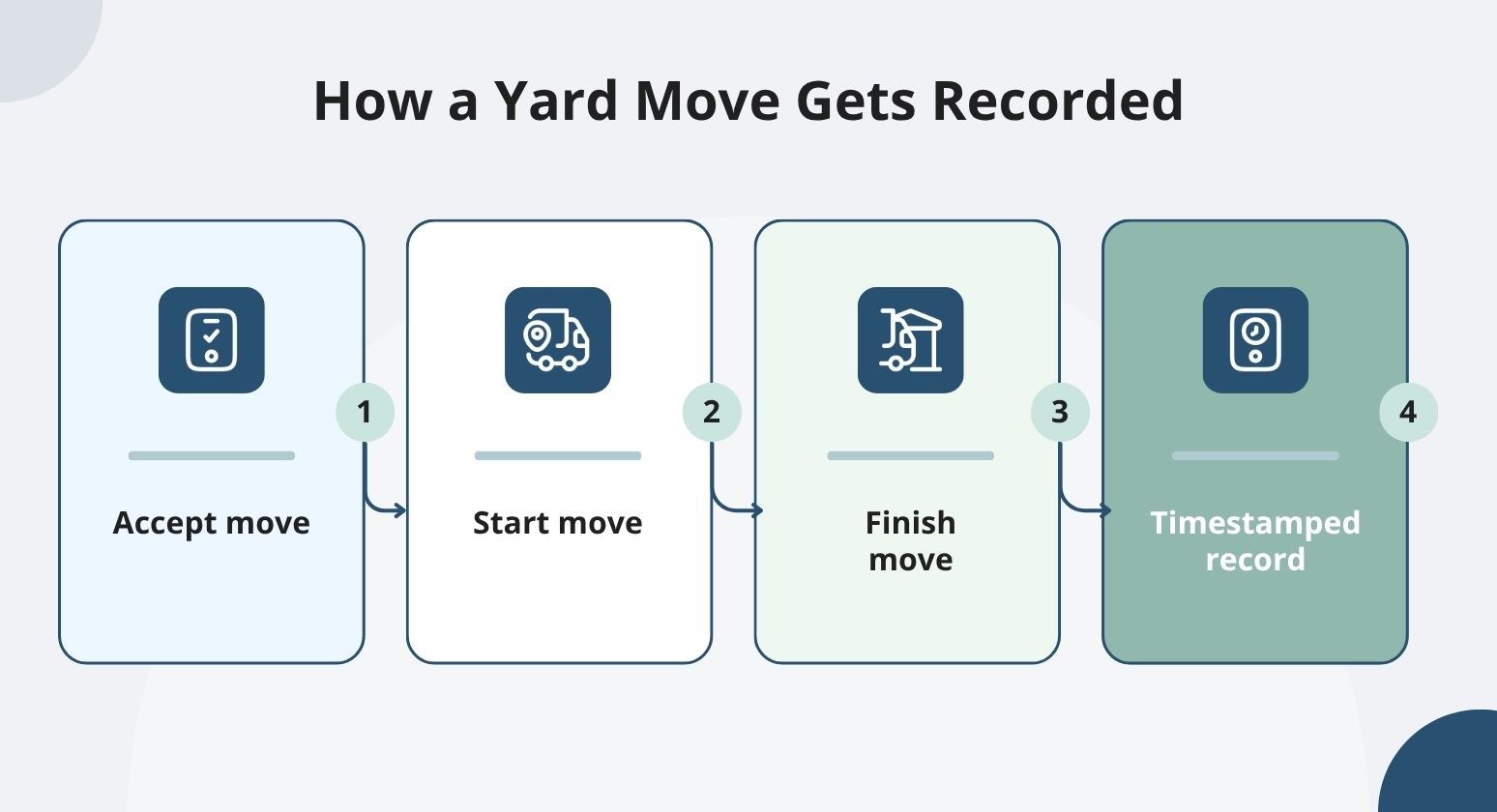
Supervisors can spot many exceptions without picking up the radio. The remaining record is the same one that holds up when an auditor asks what happened and when. C3 also describes mobile tools and task execution that support in-cab driver workflows.
Gate Flow and Driver Communication
Both YardView and C3 Solutions describe gate management capabilities. The check-in path differs. So does the driver communication method. Touchless options vary too, and those differences matter at high volume.
What Happens When a Truck Hits the Gate
Gate lines can back up fast when check-in depends on a gate guard and a clipboard. Cab exits can put drivers in the path of moving equipment, particularly if your gate volume peaks mid-shift.
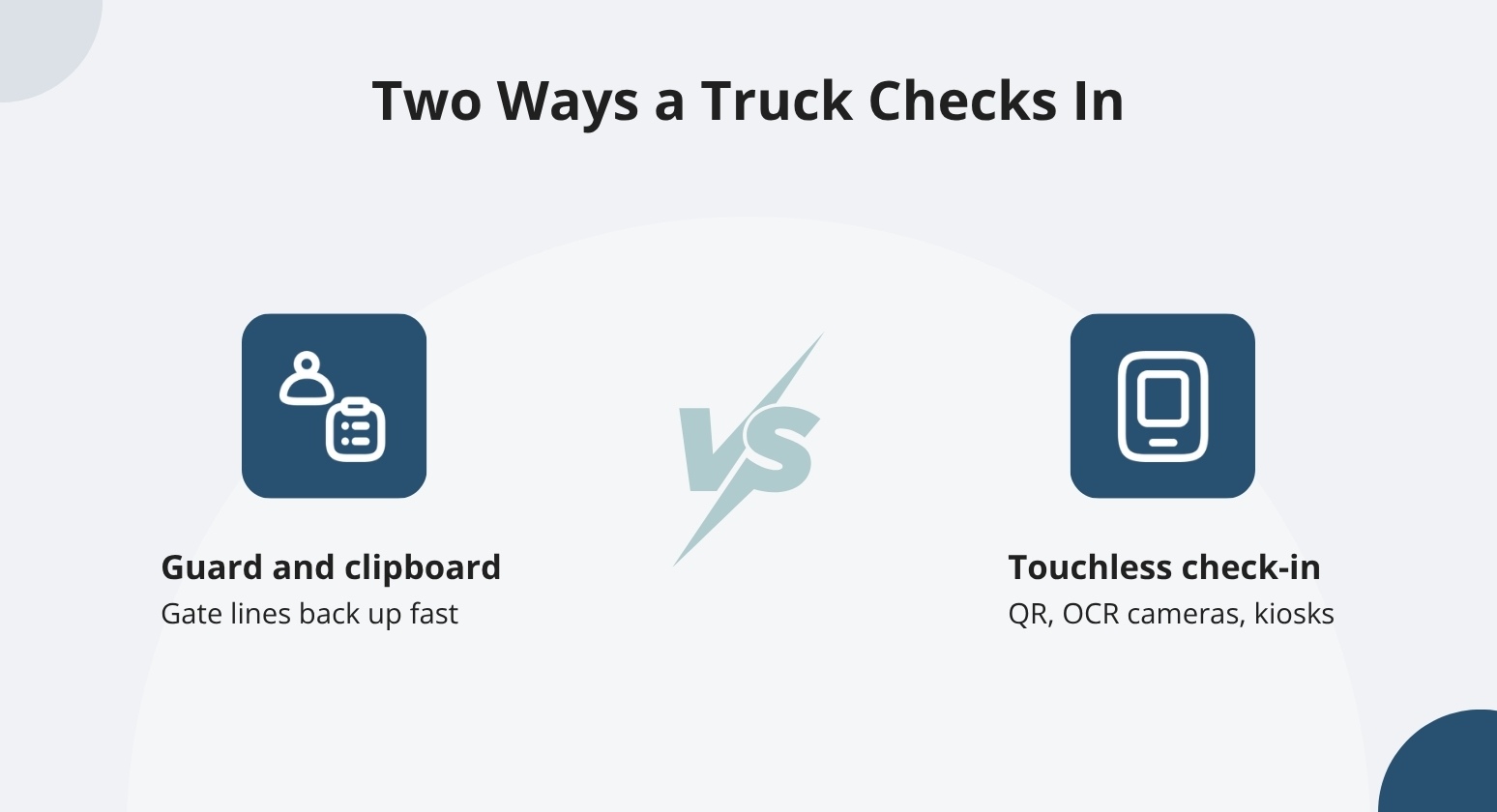
Before assuming a listed feature matches your deployment, it's worth understanding what different gate workflows change. Pre-arrival visibility lets operations know what's coming before a truck arrives. Touchless check-in options reduce how much drivers have to walk through the yard.
A Fast Pass lane keeps trusted carriers from waiting behind first-time visitors. Asking each vendor to walk through the actual check-in path for your site will show you more than a feature list.
C3 describes pre-arrival visibility and gate controls. YardView describes several touchless gate options. These include QR code scanning on a driver's own device. AI cameras with OCR read assets without a guard present. Self-service kiosks and a Fast Pass lane for trusted carriers round out the gate workflow options.
Watch: "That was quick!" — Driver reacts to automated gate check-in #yardmanagement #supplychain #saas
Shows the automated QR code gate check-in mechanic referenced in this exact sentence.
Drivers using the QR code process don't need to download an app.
One paper mill customer used an SMS-and-QR gate process to handle high-volume, contactless check-in across a range of carrier types, including many first-time visitors. That case study is worth asking YardView to walk through as a reference point for what a contactless gate process looks like in practice.
Keeping Over-the-road Drivers Informed
OTR drivers remember a bad facility. If your yard leaves drivers waiting without updates, that reputation spreads among carriers and can make it harder to attract the capacity you need.
We help you cut the time drivers spend waiting for dock assignments with text-message alerts that require no app and no login. Drivers receive an arrival confirmation, a door-ready alert naming their assigned dock, and a departure instruction when their load is complete.
Drivers no longer need to call the gate to learn where to go.
If you're evaluating driver-facing mobile tools, C3 covers what yard users can access on their devices. Confirm with both vendors which driver groups, devices, and specific notifications each configuration supports before committing.
Safety, Seal Controls, and Auditability
Safety checks and seal controls both depend on records that hold up when a customer or regulator asks for documentation. We help you turn compliance from an end-of-shift checklist into a built-in check the system enforces and records each time a driver completes a move.
Baking Safety and Compliance into Every Move
Ask any vendor where safety and inspection prompts appear in the driver workflow. Ask how responses are captured and whether each one carries a timestamp that holds up when an auditor reviews the record. If your team relies on memory or paper for safety and inspection checks, the records can be hard to defend under review. Gaps are often difficult to reconstruct after the fact.
Ask C3 how inspection prompts are incorporated into their driver workflows and how responses are stored for later review. YardView ties inspection prompts directly into each driver move task. Every response is automatically timestamped.
Compliance is enforced in the workflow rather than left to recall, reducing the paperwork burden of manual tracking and giving supervisors an auditable record when auditors ask for it.
Preventing the Wrong Trailer from Leaving
Seal mismatches can create chain-of-custody gaps. Once a trailer leaves the gate, those gaps are hard to close.
C3 describes seal-management validation rules and discrepancy reporting to flag issues during yard operations. Blind verification takes a different approach: the seal number stays hidden until the driver confirms a physical match, so the check is enforced before any trailer leaves the gate.
YardView's blind verification works this way: it catches mismatches before release and gives leadership the chain-of-custody records they need when a customer or auditor asks.
Integrations and Existing Technology
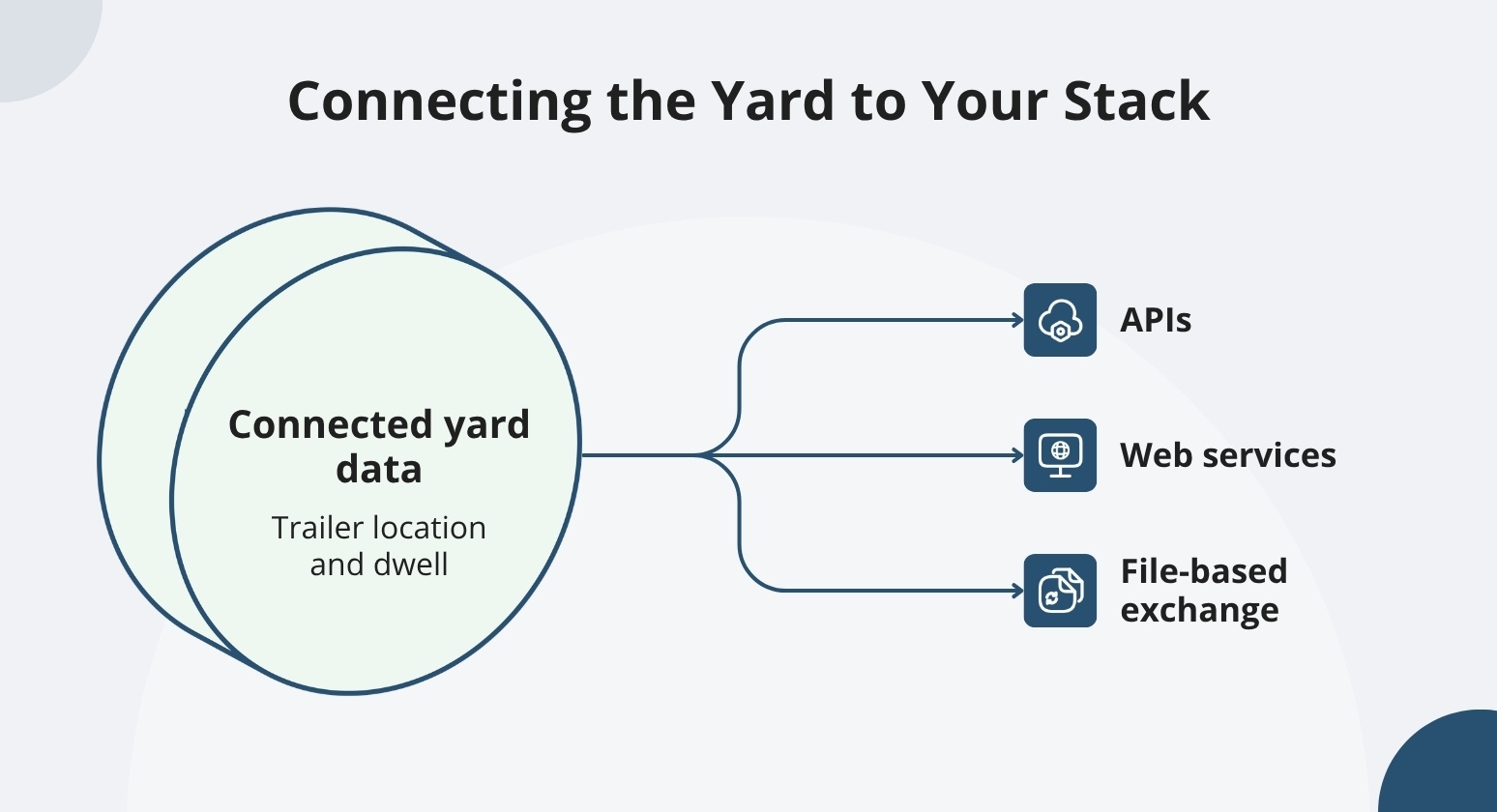
How each vendor connects to your WMS and TMS, via API, EDI, or flat file, determines whether the YMS gives you visibility into trailer location and dwell, or leaves you managing yet another disconnected system.
Connecting the Yard to WMS, TMS, and ERP
If your WMS or TMS includes a yard module, the honest question is what that module does. Most built-in yard modules handle basic slot tracking. They don't support assigning and updating driver tasks as yard conditions change, or monitoring dwell time between the gate and dock.
Before evaluating any platform, map how data will flow among your YMS, WMS, TMS, and ERP. The method matters. APIs update records in near real time. Web services and file-based transfers work well but may introduce lag depending on how they're configured.
It's worth asking both vendors exactly how data flows in and out of your specific stack before committing.
We help you connect YardView to any system. That includes enterprise platforms and homegrown solutions. YardView syncs with SAP, Oracle, Manhattan Associates, Blue Yonder, and Trimble. Connections run via APIs, web services, or file-based exchange. C3 Solutions, the other platform covered in this article, supports web services, XML transfers to SFTP, and flat-file transfers to SFTP.
What Hardware Each Workflow Requires
Before committing to either platform, ask each vendor to list every device, camera, kiosk, and connectivity requirement for the workflows you're evaluating. Ask specifically which existing assets can support the workflows you need.
YardView can work with the GPS already installed in your yard trucks. Most configurations need no additional proprietary hardware; your existing PCs, tablets, phones, and in-cab devices do the work.
C3's hardware requirements will depend on your specific deployment. Confirm directly with their team what each workflow needs before you plan your budget.
Implementation, Training, and Support
Ask each vendor how they structure the rollout, how long it takes, and what your crew does on Day One. The answers tell you more than any feature list.
How Long Before the Yard Is Live
A phased rollout lets a YMS go live without stopping daily operations. The key question for any vendor is whether their first phase mirrors what your crew already does, or asks them to change before the system is proven. Ask both vendors for a site-specific schedule, required staffing, and a clear picture of how daily operations continue during each phase.
When you're evaluating vendors, C3 uses an iterative approach it calls the C3 Hub Agile Management Process, or CHAMP. For our part, most YardView implementations take six weeks or less. We help you go live without stopping the yard. Before changing anything, we mirror your existing processes in the software.
Going live in six weeks or less means the system tracks dwell, flags detention risk, and cuts manual check-in steps before the next budget cycle closes. That's what turns a YMS from a hard budget conversation into a straightforward approval.
Training a Yard Crew and Getting Support After Launch
If your yard sees high turnover, training time costs real money. Before you sign with either vendor, ask both for a role-by-role training plan. Good due diligence includes confirming support hours and escalation paths, and ensuring a real person is available when something goes wrong.
YardView's color-coded, one-to-two-click interface supports role-specific training in about an hour, with yard staff returning to work the same shift. YardView offers 24/7 U.S.-based support with real humans as part of the partnership. Confirm those terms in your proposal before you sign.
Fit for Facility Operations Leaders and Network Executives
The sub-sections below address how each perspective translates into specific evaluation criteria.
Day-to-day Facility Control
A good evaluation starts with a representative shift scenario. Have each vendor walk through what happens when a late arrival hits the gate, a move becomes urgent mid-shift, or a trailer ends up in the wrong spot.
The screen should show you which trailer is misplaced and where it needs to go next. If the crew has to make radio calls to answer those questions, the software may not be doing enough of the heavy lifting.
Have each vendor show how non-tech-oriented operators use the system in real conditions.
Network Performance and P&L Visibility
Multi-site leaders need comparable KPIs across every facility, audit records that hold up under scrutiny, and a platform that can report at the network level without forcing every site to run the same daily process.
Before committing to a system, ask each vendor how local process differences coexist with network-level reporting. Ask what the detention and dwell data show, and what action it enables for a dispatcher or a network planner.
When comparing systems, these questions also matter for rollout economics and integration effort. Ask how many hours a typical integration takes, and what the per-site expansion cost looks like.
If your network is multi-facility, YardView's network views show dwell time by facility, detention costs by site, and gate throughput across locations, so you can shift drivers, adjust staffing, or rebalance trailer assignments based on what the data reveals.
If a vendor claims significant savings, request the baseline, the time period, and the assumptions behind the figure. Any battle-tested platform can back up its claims with specifics.
Choose the Yard Management Platform That Shows You What You've Been Missing
Comparing YardView against C3 solutions comes down to whether a platform can replace the clipboards, whiteboards, and spreadsheets still running the gate, yard, and dock, or simply add another screen to an already fragmented operation.
YardView, built by Cypress Inland Corporation since 1998, delivers end-to-end visibility across every trailer movement before, during, and after each visit, with a web-based SaaS platform on AWS already trusted by more than 10,000 users globally.
- Drag-and-Drop Visibility Console: A graphical representation of the entire yard shows assets as color-coded rectangles with up to 20 data points each, spanning docks, yard spots, in-transit lanes, and waiting zones.
- Four-Path Appointment Scheduling: Create dock appointments through ASN/TMS/WMS integration, carrier self-service portals with secure credentials, system-triggered events, or manual entry, with confirmations emailed as gate passes.
- Flexible Gate Configurations: Support touchless, manned, or unmanned gates with AI cameras for OCR, QR code scanning from the driver's device, kiosks, ELD integrations, GPS geofencing, and a Fast Pass option for trusted carriers.
- Intelligent Move Assist: In-cab move requests arrive in priority order, with automated "next best move" recommendations based on backend mapping, proximity, urgency, and request age; skipped suggestions require a documented reason that feeds continuous improvement.
- One-Hour Training Curve: Frontline adoption across PC, tablet, mobile, kiosk, and in-cab devices happens fast because YardView training takes an hour or less.
Explore how YardView handles the moves, gates, and appointments your operation runs every day.