Key takeaways:
- Dock scheduling controls where product will be staged, where trucks need to be assigned to, and optimizes forklift operations. Dock scheduling doesn't log where a trailer sits two hours after gate check-in.
- Dock scheduling tools aren't built to handle yard audits. Manual yard audits take 2+ hours of personnel time per day to walk the yard.
- YardView customers have reported up to 75% faster yard audits and up to 95% lower detention and demurrage costs, results tied to specific operations rather than guaranteed outcomes.
- A yard management system is modular, so a facility can keep an existing appointment scheduling platform and bolt on yard management: yard orchestration, in-cab tasking, spotter optimization, or self driver check-in.
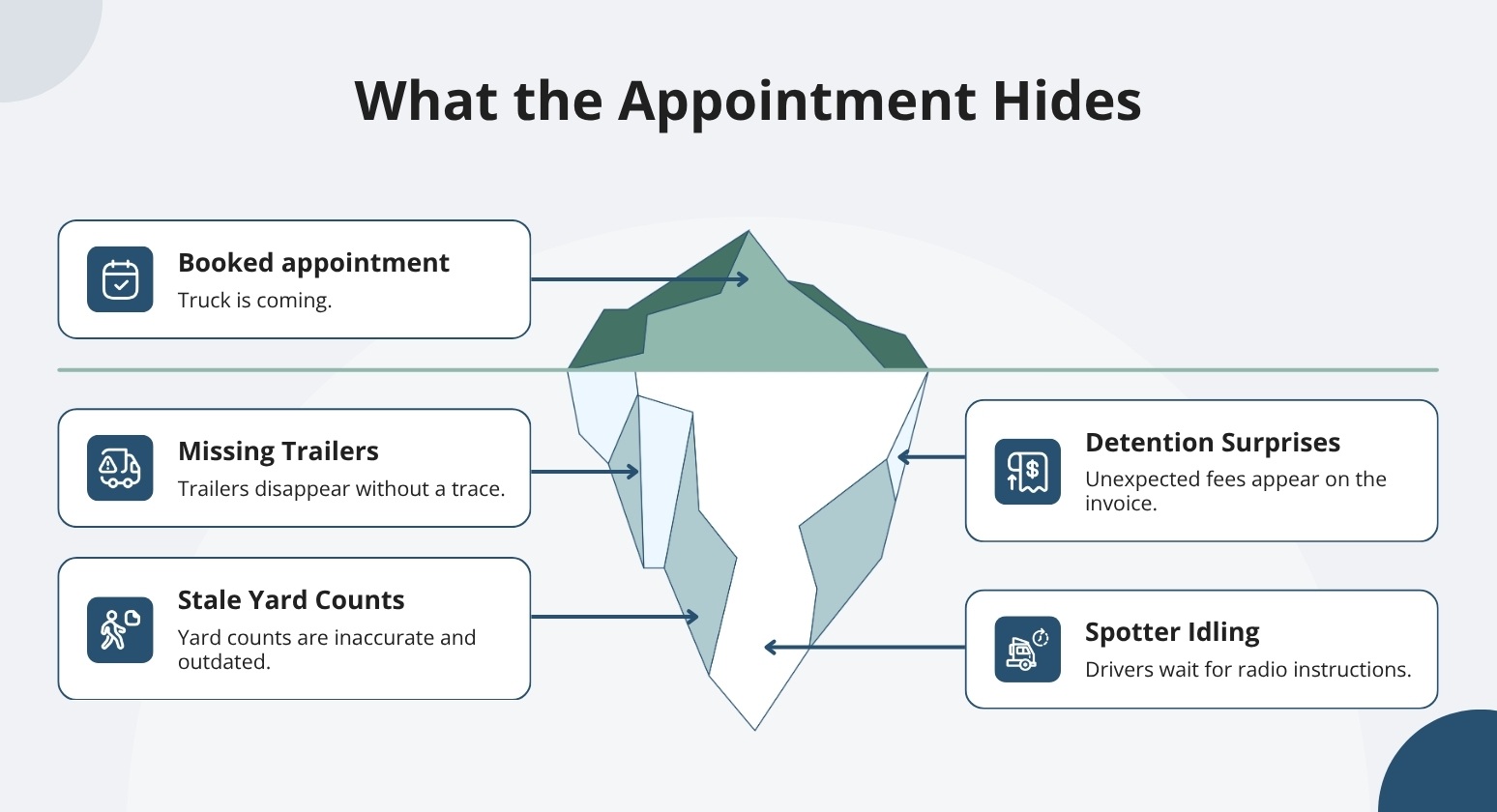
A booked appointment tells you a truck is coming. It doesn't tell you where that trailer sits two hours after check-in, or which move your spotter should take next.
That second question is where a lot of facility delay hides. If your team still walks the lot to confirm counts, or learns about detention when the invoice shows up, the main source of delay likely starts after the gate, not before.
Dock scheduling manages arrival times and door assignments. Yard management coordinates assets and work once the truck is on site. What follows are five signs to look for, a check you can run against your own yard.
Five Signs Your Appointment Calendar Is No Longer Enough
These five signs are operating conditions you can observe on your own yard. If you see one or more regularly, it's worth digging deeper. If several apply, the signs below will help you pinpoint where the delay is building.
1. Trailers Go Missing After Check-in
The appointment is in the system. The truck checked in at the gate. And now nobody knows where that trailer went.
If your yard drivers spend part of their shift hunting for a trailer that arrived hours ago, the appointment tool did its job, but something else didn't pick it up. Your gate logged the check-in. Nothing is logged about where the trailer went after that.
That gap can cost you time on every subsequent move: the yard driver waits for instructions while the dispatcher fields radio calls instead of managing work.
Two metrics to track: time spent locating a trailer after check-in, and time from check-in to the first move. Many operations see both metrics improve once the system has a known asset position.
2. Yard Counts Are Stale Before the Next Shift
When manual yard walks are the only source of truth, the count is stale the moment the walk ends. A single missing trailer is just the surface. The deeper problem is that your team can't trust what's on site without sending someone to verify it again.
Walking the lot three or four times a day can consume two or more hours of driver time that could go toward moving equipment.
We help you cut the number of manual lot walks your team needs each shift. Our live yard map shows which trailers are on site and where they're positioned, so a supervisor can decide which trailer to pull next without waiting for the next walk.
The in-cab lot check and yard audit tools let drivers verify and correct asset positions while they're already moving. No separate audit run needed.
Watch: Faster Lot Checks: Confirm, Update, Done. #yardmanagement #supplychain #efficiency #saas
Shows the exact Lot Check mechanic of verifying and updating trailer positions in seconds.
Audits still happen for compliance and exception checks. But customers have reported yard audits up to 75% faster with these tools. That's a customer-reported result, not a guaranteed outcome.
To measure where you stand, track how often your team walks the lot, how often counts don't match, and how long each audit takes.
3. Detention Surprises You Despite Scheduled Appointments
An appointment confirms when a truck should arrive. It doesn't show how long that truck sits on-site after check-in. If your scheduling tool doesn't track dwell time past the gate, that time goes untracked, so fee thresholds are only visible once the invoice arrives.
For network leaders, that gap is a real budget problem. Detention and demurrage fees add up between invoices. Without timestamped records for arrival, dock access, and departure, someone has to manually pull gate logs and contact carriers to check each charge.
That work often happens after the invoice is already due.
Dwell tracking shows how long each asset has been on site. Proactive alerts fire before dwell crosses into fee territory, so a supervisor can act on a trailer sitting idle before the clock runs out. Timestamped records give you a verifiable log of each visit to review charges.
That reduces time spent verifying charges when you need to cross-check invoice details against your own records.
A good starting point is comparing your average on-site dwell time with the charges you received, then looking at what share of visits came close to triggering a fee threshold last month.
Customers have reported up to 95% reductions in detention and demurrage costs. Results like that reflect specific operations and aren't guaranteed.
4. Spotters Still Wait for Radio Instructions
When radio back-and-forth takes over, spotter hours disappear fast. The dispatcher fields location questions while drivers sit idle waiting to learn which trailer moves next. That gap between "task assigned" and "task started" is where shifts run long, and overtime creeps in.
An appointment calendar tells you a truck is arriving. It doesn't tell your yard driver which trailer to move first, or second, or why.
We help you replace that radio loop with a prioritized move list sent directly to each driver's in-cab device. The workflow is straightforward: Accept, Start, Finish. Next-best-move recommendations surface automatically, so drivers don't have to wait for a dispatcher call to know what comes next.
The back-and-forth between cab and control room drops out of the process.
If your team is seeing this pattern, pull a few numbers. Track how many dispatch exchanges happen per shift. Measure completed moves per driver per shift. Then look at the gap between when you assign a move and when the driver starts it.
That last number is usually the clearest signal. Some YardView customers report 50% faster spotting after moving to in-cab tasking. That's a customer-reported result, not a guaranteed outcome, but it points to where the time is going.
5. The Gate and Dock Still Run on Separate Information
Gate and dock teams often run on separate information. When that happens, the gap can show up the moment a driver arrives for a booked slot. Check-in is manual. The door assignment has changed. Nobody told the gate.
Drivers wait while someone sorts out dock status by phone. Drivers waiting for dock status may exit the cab to sort it out; exiting the cab in an active yard can increase physical exposure for drivers moving through live traffic.
We help you connect check-in, live yard activity, and dock assignment into one shared record. Drivers scan a QR code on their own device. No app required. SMS instructions direct them through the visit without leaving the cab.
Watch: "That was quick!" — Driver reacts to automated gate check-in #yardmanagement #supplychain #saas
Demonstrates the automated QR code gate check-in described in this section.
Gate and dock teams see the same live status: which door is assigned, whether it's changed, and where the driver is in the process.
The metrics worth tracking here are gate wait time, check-in-to-door time, and door utilization.
If check-in-to-door time is long or door utilization is uneven across shifts, the gap between your appointment calendar and your on-site execution is likely visible in those numbers.
How YardView Turns Your Appointment Calendar into Full Yard Visibility
Scheduling appointments answers when a trailer should arrive, but it goes quiet the moment that trailer clears the gate. When drivers wait for doors, trailers sit unaccounted for, and dwell clocks run without anyone watching, the gap is not scheduling discipline; it is yard visibility.
YardView closes that gap by connecting appointments to gate, yard, and dock activity in one web-based platform built on 28 years of yard operations expertise.
- Drag-and-Drop Visibility Console: A graphical view of the entire yard shows assets as color-coded rectangles with up to 20 data points each, covering load status, carrier code, trailer ID, location, and dwell time.
- Post-Arrival Appointment Tracking: Dock scheduling captures wait times, dwell, and door activity after check-in, so appointment data continues past the gate instead of stopping there.
- Move Assist With Next Best Move: In-cab move requests arrive in priority order with automated recommendations based on backend mapping, proximity, urgency, and request age, and skipped suggestions require a documented reason.
- Flexible Gate Configurations: Touchless, manned, or unmanned setups support QR code check-in from a driver's own device, AI cameras for OCR, kiosks, ELD integrations, GPS geofencing, and Fast Pass access for trusted carriers.
- YardView Analytics: Reporting spans facility dwell, dock door dwell, dock and trailer turn-time, carrier commitment, detention thresholds, and yard driver productivity metrics such as moves requested, accepted, started, and finished.
Explore YardView when the whiteboard and appointment calendar no longer tell the whole story.